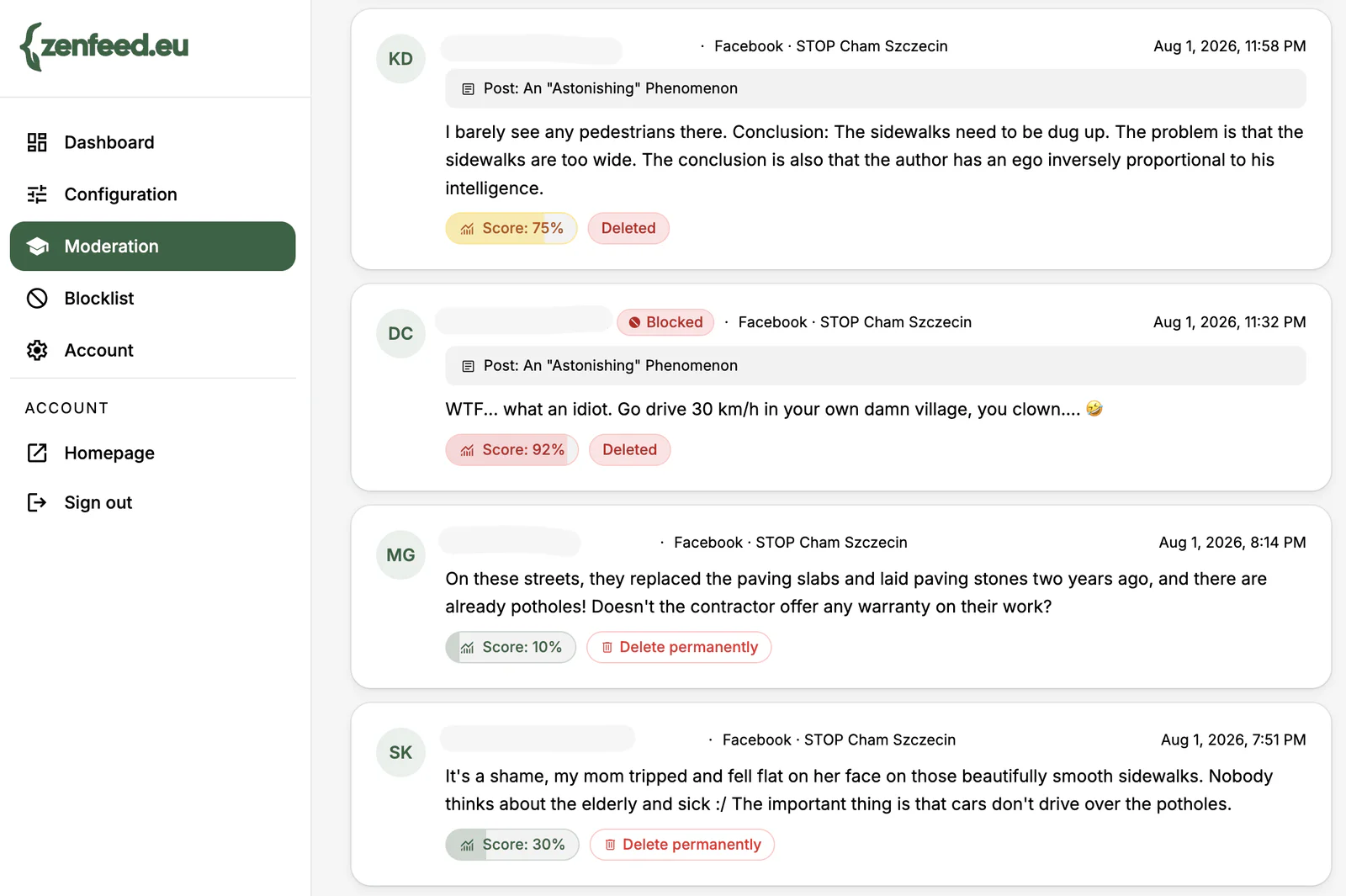
The easiest way to explain how autonomous moderation works is with a concrete example instead of an abstraction. The screenshot below comes from a real Moderation panel in ZenFeed — the commenters’ identities are anonymised, but the comment text, toxicity scores, and decisions are exactly what happened on a customer’s account.
These are four comments on a single post from STOP Cham Szczecin, an organisation focused on traffic calming and pedestrian infrastructure — a topic that, by its nature, provokes strong opinions and disagreement. That’s exactly the kind of context where the line between “harsh criticism” and “hate” is hardest to draw.
The comment the system removed on its own
The highest toxicity score in the group — 92% — went to: “WTF… what an idiot. Go drive 30 km/h in your own damn village, you clown…” A direct insult with no ambiguity attached — and that’s exactly why it crossed the auto-delete threshold. The comment was gone before anyone on the page’s team ever saw it, and the author was additionally added to the blocklist (the “Blocked” tag) — their future comments on this page get auto-rejected without being scored again.
The comment a moderator removed
The second comment, scored 75%, read: “I barely see any pedestrians there. Conclusion: The sidewalks need to be dug up. The problem is that the sidewalks are too wide. The conclusion is also that the author has an ego inversely proportional to his intelligence.” Under the guise of a “logical argument,” it ends with a personal attack on the post’s author — but 75% sits below the auto-delete threshold, so the system didn’t touch it on its own. The comment was flagged as needing attention (the amber “Score: 75%” badge) and stayed visible until a moderator reviewed it in the panel and manually decided to remove it.
That’s the actual difference between amber and red in the panel: amber means “this looks borderline, check it,” red means “already handled.”
Two comments that stayed up
The third comment, scored just 10%, covered the same topic: “On these streets, they replaced the paving slabs and laid paving stones two years ago, and there are already potholes! Doesn’t the contractor offer any warranty on their work?” — specific, substantive criticism of the contractor’s work. No attack on anyone, so despite the negative tone, it never came close to the review threshold.
The fourth, scored 30%, is the more interesting case: “It’s a shame, my mom tripped and fell flat on her face on those beautifully smooth sidewalks. Nobody thinks about the elderly and sick :/ The important thing is that cars don’t drive over the potholes.” The tone is bitter, and “beautifully smooth” is clearly sarcastic — but the sarcasm targets the situation, not a person. The system caught that distinction and left the comment up despite the raised emotional register.
What actually separates these three decisions?
It isn’t whether the comment is critical — all four are critical of either the road project or the post’s author. What determines the score is whether the criticism turns into an attack on a specific person. The auto-delete threshold only decides one thing: who makes the final call. The 92% comment contains an insult with nothing to soften it — hard to get wrong, so the system removes it on its own. The 75% comment also attacks personally, but in a more disguised form (a fake “logical argument”), so instead of risking a wrong automatic call, the system hands it to a human. Comments 3 and 4 — even the one with the bitter, sarcastic tone — criticise the situation or the contractor, not any individual, so they never even approach the review threshold.
That’s exactly the line a keyword list can’t draw: none of these four comments contains a “classic” slur beyond a single swear word in the 92% comment. The score depends on the context and intent of the whole message, not individual words — a point we covered in more depth in manual vs. automated moderation.
What do the numbers and colours in the panel actually mean?
Toxicity score is the system’s estimated confidence that a comment breaks the rules. The panel colour-codes it into three tiers that map directly to three levels of decision autonomy:
- Muted grey — the comment stays visible with no flag attached. You still get a Delete permanently button if you want to remove it manually anyway.
- Amber — the comment crosses the threshold for human review, but not the auto-delete threshold. It stays visible until a moderator makes a manual call.
- Red — the comment crosses the auto-delete threshold and disappears with no human involved.
The Blocked tag next to an author means they’ve been added to the blocklist — their future comments get auto-rejected without going through scoring again.
Deleting isn’t the only option
Every decision in this example — automatic or manual — ends with the comment being deleted. That’s the result of a specific decision, not the only available action: alongside “Delete,” a moderator (or the account’s configuration) can choose “Hide” instead — the comment disappears from view for other visitors, but the author still sees it on their end, with no indication that no one else can see it anymore. It’s a gentler option: if it’s a false positive, there’s no confrontation or feeling of being censored, because from the author’s perspective the comment is just… there.
Whether “Delete” or “Hide” is the default action for a given threshold is a separate, account-level configuration choice — independent of the toxicity threshold itself, which only decides when that action fires.
Why this matters for NGOs and brands
Organisations that touch socially charged topics — infrastructure, local politics, animal rights, climate — get exactly this mix of comments: some is legitimate, sharp criticism that needs to stay up, or you end up looking like you’re censoring inconvenient opinions. Some is personal attacks that poison the discussion and drive other participants away. Autonomous moderation doesn’t mean no one ever looks at comments — it means the obvious cases disappear immediately, without waiting on anyone on the team, while the borderline cases go to a human instead of being deleted blindly or left unchecked.
Registered NGOs get the full ZenFeed feature set for free through the non-profit programme. See the pricing page for plan and limit details.